The UI kit
platform/nds32/gp5_ui.h: the screen and control pieces most firmwares need, built on
parameters. Everything here is optional. A firmware with its own look, like Dreamcatcher, uses none of
it or only some of it. A firmware that doesn’t use the kit doesn’t carry it: its image is the same with or without
the kit.
| piece | does |
|---|---|
gp5_param_format() | a value as text, the way Launchpad shows it |
gp5_ui_page_t | a settings page: a row per parameter, PARA picks and adjusts |
gp5_ui_page_message() | a short message in the page’s last row |
gp5_ui_menu_t | a menu of actions: PARA picks, a click runs one, risky ones ask “Sure?” first |
gp5_pickup_t | the volume knob takes over a parameter without a jump |
A settings page
#include "gp5_ui.h"
#include "fonts/sans_16.h"

static const uint8_t rows[] = { GP5_P_RATE, GP5_P_DEPTH, GP5_P_SHAPE, GP5_UI_PRESETS };
static gp5_ui_page_t page = { .rows = rows, .n = 4, .font = &gp5_font_sans_16, .row_h = 20, .upper = 1 };

void fw_para_turn(int d) { gp5_ui_page_turn(&page, d); }
void fw_para_click(void) { gp5_ui_page_click(&page); }
int fw_draw(int force)   { return gp5_ui_page_draw(&page, force); }
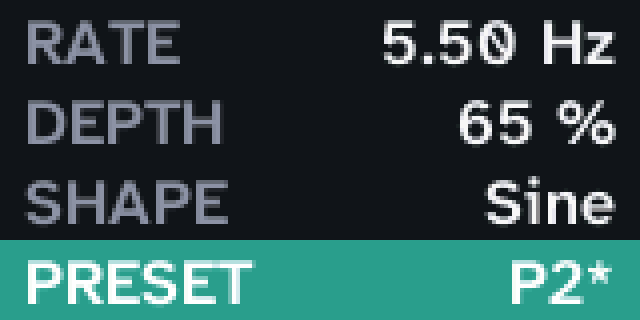
How it works on the pedal:
- Turn PARA to pick a row. The row picked is highlighted, and the page scrolls when there are more rows than fit.
- Click to adjust it. A bar on the left and
< >around the value show you’re adjusting. Turning now changes the value; click again when done. - Numbers stop at their range, choices go round, and read-only parameters can’t be adjusted.
- The presets row (
GP5_UI_PRESETS, if the manifest has"presets") showsP2 name, with*when the sound differs from it. Adjusting it loads presets as you turn; empty ones are shown but not loaded. Saving is the firmware’s choice of control. The tremolo saves on a PARA hold:
void fw_para_hold(void)
{
    if (gp5_preset_save(gp5_ui_page_preset(&page))) gp5_ui_page_message(&page, "Saved", 1500);
}
What you can set (leave anything else 0 for its default):
| field | |
|---|---|
rows, n | the rows: parameter ids and GP5_UI_PRESETS. Without rows, every parameter that isn’t GP5_P_HIDDEN, then the presets |
steps | per row, how much one click changes it. Default: about 1/50 of the range, rounded to 1, 2, 5, 10, 20 …; values stay on that grid |
font | required: a font your firmware includes (fonts.md) |
row_h | row height; default the font’s line height. sans_16 with 20 px rows gives 4 rows; sans_12 with 16 px gives 5 |
y, h | the part of the screen the page uses (default: all of it), e.g. below a header you draw yourself |
title | a title row at the top |
upper | labels in capitals |
theme | colours: { bg, ink, dim, accent, on_accent } as 0xRRGGBB; default dark grey, white and teal |
faded | set to 1 to grey the values out, e.g. while the effect is bypassed; the page redraws when it changes |
gp5_ui_page_draw draws one changed row per call and returns non-zero while more are left, like any fw_draw.
Return its result from yours. Values that change from elsewhere (a preset load, the computer) show up by
themselves. gp5_ui_page_row() tells you which row is picked, for a firmware that wants to show more about it.
A menu
Actions to choose from: save, reset, go back. Turn PARA to pick an item, click to run it. An item marked confirm
shows “Sure?” and runs only on a second click; turning away or waiting 3 s cancels. An item’s value() shows text on
the right, such as the preset “Save” would write to.
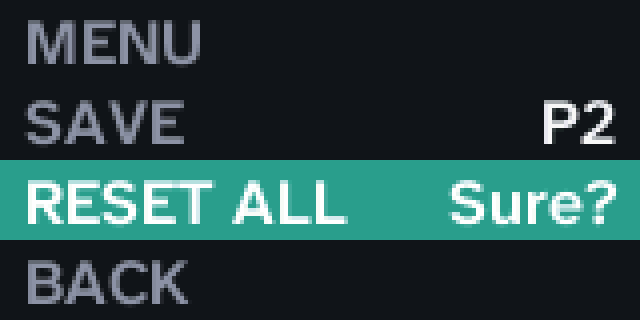
The tremolo’s page with a menu on a PARA hold (it runs as it is in the simulator):
static const uint8_t rows[] = { GP5_P_RATE, GP5_P_DEPTH, GP5_P_SHAPE, GP5_UI_PRESETS };
static gp5_ui_page_t page = { .rows = rows, .n = 4, .font = &gp5_font_sans_16, .row_h = 20, .upper = 1 };
static int in_menu, switched;                    /* switched: draw everything once after a switch */

static void close_menu(void) { in_menu = 0; switched = 1; }
static void save(void)
{
    if (gp5_preset_save(gp5_ui_page_preset(&page))) close_menu(), gp5_ui_page_message(&page, "Saved", 1500);
}
static void reset(void)
{
    for (unsigned id = 0; id < GP5_NPARAMS; id++) gp5_param_set(id, gp5_param_table[id].def);
    close_menu(); gp5_ui_page_message(&page, "Reset", 1500);
}
static const char *save_slot(void)               /* the preset "Save" writes to: the one the page shows */
{
    static char t[4] = "P1";
    t[1] = (char)('1' + gp5_ui_page_preset(&page));
    return t;
}
static const gp5_ui_item_t items[] = {
    { "Save", save, save_slot, 0 },
    { "Reset all", reset, 0, 1 },                /* asks for a second click */
    { "Back", close_menu, 0, 0 },
};
static gp5_ui_menu_t menu = { .items = items, .n = 3, .font = &gp5_font_sans_16, .row_h = 20, .upper = 1, .title = "MENU" };

void fw_para_turn(int d) { if (in_menu) gp5_ui_menu_turn(&menu, d); else gp5_ui_page_turn(&page, d); }
void fw_para_click(void) { if (in_menu) gp5_ui_menu_click(&menu); else gp5_ui_page_click(&page); }
void fw_para_hold(void) { in_menu = !in_menu; switched = 1; if (in_menu) gp5_ui_menu_pick(&menu, 0); }

int fw_draw(int force)
{
    if (switched) { force = 1; switched = 0; }
    return in_menu ? gp5_ui_menu_draw(&menu, force) : gp5_ui_page_draw(&page, force);
}
| item field | |
|---|---|
label | the item’s name |
run | called on a click (or the second click, with confirm); 0 for an item that only shows something |
value | optional: a function returning the text on the right; asked whenever the menu draws, so it can change |
confirm | 1: ask “Sure?” first |
The menu takes the same font, theme, title, y, h, row_h and upper as the page.
gp5_ui_menu_message() shows a message in its last row, gp5_ui_menu_pick() picks an item (the first, say, when the
menu opens) and gp5_ui_menu_item() says which is picked.
Value text
char t[16];
gp5_param_format(GP5_P_TIME, gp5_param(GP5_P_TIME), t);     /* "350 ms", "1.50 s" */
It shows choices by name, and the unit as Launchpad does: 50 %, -6 dB, +5.5 dB, 440 Hz, +7 st. For
GP5_U_CUSTOM it asks your fw_param_text(), so the screen and Launchpad always agree.
Knob pickup
When the volume knob takes over a setting (Dreamcatcher’s knob does this), the setting shouldn’t jump to wherever the knob happens to be:
static gp5_pickup_t knob;

void fw_init(void) { gp5_level_own(1); gp5_level_set(255); gp5_pickup_start(&knob, GP5_P_MIX); }
void fw_tick(void) { gp5_pickup_poll(&knob); }
Nothing changes until the knob passes the parameter’s current value; from then on the knob sets it over its whole
range. Start it again (gp5_pickup_start) whenever the knob gets a new job or the value changes elsewhere (a preset
load). Without gp5_level_own(1) the knob stays the output level as well.
Trying it without a pedal
python3 tools/simulate.py <firmware> --script s.txt runs your page and menu with scripted controls and saves the
screens (simulator). firmwares/tremolo/test/screen.sh runs the tremolo’s control half on the computer, presses its controls and saves
each screen as a PNG, kit and all. Copy it for your own firmware. platform/nds32/test/ui_test.sh tests the kit
itself.